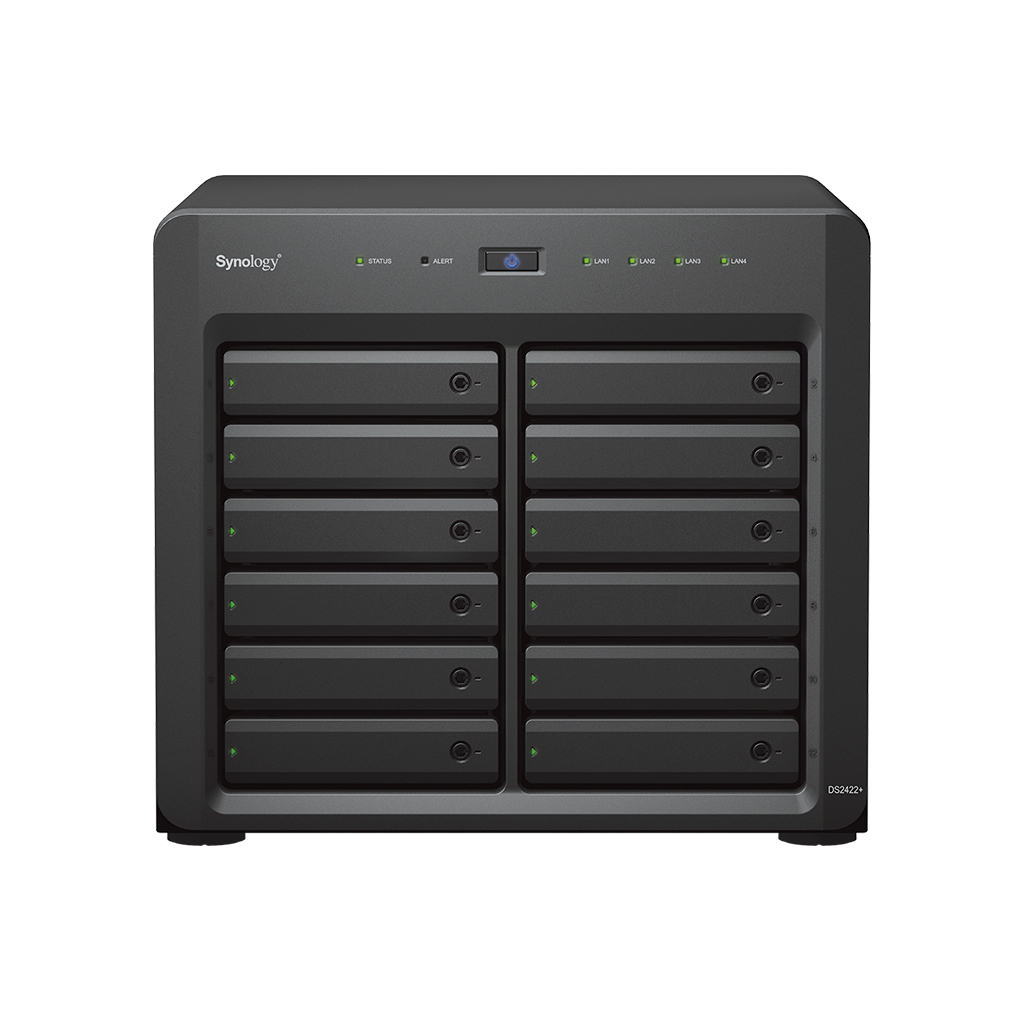
<a href="https://www.synology.com/en-global/products/DS2422+" style="display: block;">https://www.synology.com/en-global/products/DS2422+</a><br><br><b>Built for high-performance mass storage</b><br>The 12-bay Synology DiskStation DS2422+ is a capable choice for small and medium businesses with large storage, file sharing, and data protection requirements in a multi-user environment. It comes with powerful storage management, file syncing, surveillance, and backup software, and is suitable for editing high-quality video and as VM storage.<br><br><b>Faster performance</b><br>Comfortably run demanding applications and processes with multiple users on the DS2422+ while still enjoying a smooth and fast experience. See the improvements that help make your business productive.<br><br><b>Rise to the challenge</b><br>Prepare your DS2422+ for heavy workloads or upgrade flexibly as your business continues to grow. Use add-in cards to add bandwidth, fast SSD cache, or both.<br><b>Maximize bandwidth</b><br>Handle heavier input/output and serve more users with dual-port Synology 10 or 25GbE network interface cards.<br><b>Boost storage performance</b><br>Accelerate HDD arrays with an M.2 NVMe SSD adapter card and SNV3000 series SSDs, or install SAT5200 SATA SSDs in drive bays to increase performance with SSD cache.<br><b>Do both with one card</b><br>Add both 10GbE connectivity and M.2 NVMe SSD slots for SSD cache with a single combination NIC and adapter card.<br><br><b>Active Backup Suite</b><br>Securely back up Windows clients and servers, Microsoft 365 and Google Workspace accounts, file servers, and VMware® and Hyper-V® virtual machines with the Active Backup Suite.<br><br>Leverage built-in deduplication technology to reduce backup sizes and multi-versioning to allow flexible restoration. <br><b>Implement a 3-2-1 backup strategy</b><br>Combine local and remote backup strategies to achieve fully redundant protection of your IT infrastructure using Synology and third-party solutions.<br><b>Hyper Backup</b><br>Back up files, iSCSI LUNs, installed applications, and system configurations to destinations including Synology C2 Storage, public cloud platforms, USB devices, file servers, local folders, or other Synology NAS.<br><br>Set and forget backup tasks with regular schedules, enhance security with fine-grained user permissions and encryption, keep backup sizes small with built-in deduplication,4 and restore data flexibly with multi-versioning.<br><b>Snapshot Replication</b><br>Snapshot Replication enables flexible point-in-time snapshots of shared folders and virtual machines with an RPO as low as 5 minutes and recovery within seconds.<br><br><b>Ready for remote work</b><br>Empower your workforce to collaborate, share files, and communicate from anywhere.<br><b>Synology Drive</b><br>Access and collaborate on team documents via web portal, desktop clients, and mobile apps with powerful cross-site sync and file management.<br><b>Synology Office</b><br>Collaborate in real time on documents, spreadsheets, and slides for greater synergy and productivity.<br><b>Synology Chat</b><br>Instantly message colleagues and organize conversations to achieve clear and cohesive communication.<br><br><b>Certified virtual machine storage</b><br>DSM streamlines provisioning for and management of virtual machines with full certification for VMware® vSphere™, Microsoft® Hyper-V®, Citrix® XenServer™, and OpenStack virtualization environments.<br><br>Synology Storage Console for VMware® or Windows platforms lets you manage storage directly from your hypervisor. VMware® VAAI integration and Windows ODX help offload storage operations and speed up data transfer, and a Kubernetes CSI driver lets you provision and manage volumes directly from the K8s CLI.<br><br><b>Powered by Synology DiskStation Manager</b><br><b>Data Protection</b><br>Keep your business safe from data loss and minimize service downtime.<br><b>User Management</b><br>Manage user accounts and devices throughout your business with powerful directory services.<br><b>Security</b><br>Shield your Synology NAS from the most sophisticated threats with industry-leading security solutions.<br><b>File Management</b><br>Manage, sync, and share files from multiple devices through a centralized platform.<br><b>System Administration</b><br>Manage the health of your deployments and centrally administer updates with ease.<br><b>Surveillance</b><br>Protect your home or business with intelligent monitoring and video management tools.<br><br><ul><li>AMD Ryzen™ Quad-core 2.2 GHz</li><li>2,201/1,383 MB/s sequential read read/write throughput</li><li>Easily add 10/25GbE and NVMe SSD cache</li><li>Expand to 24 bays with one DX1222 expansion unit</li></ul>
Synology DiskStation DS2422+. Capacité totale de stockage installée : 192 To, Type de périphérique de stockage installé : HDD, Types de périphériques de stockage pris en charge : HDD et SSD. Famille de processeur : Ryzen Embedded, Fabricant du processeur : AMD, Modèle de processeur : V1500B. Mémoire interne : 4 Go, Type de mémoire interne : DDR4, Vitesse d'horloge de la mémoire : 2666 MHz. Débits de données Ethernet LAN : 10 100 1000 Mbit/s, Protocoles réseau pris en charge : SMB1 (CIFS), SMB2, SMB3, NFSv3, NFSv4, NFSv4.1, NFS Kerberized, iSCSI, Fiber Channel,.... Type de châssis : Ordinateur de bureau , Type de refroidissement : Actif, Couleur du produit : Noir