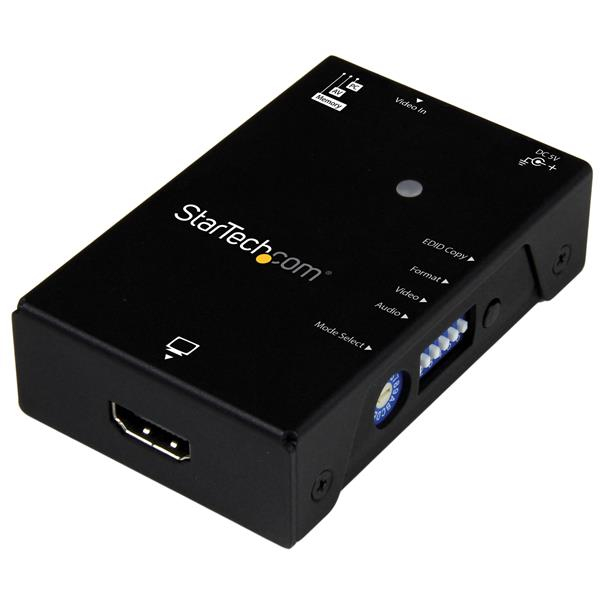
<a href="https://www.startech.com/AV/Converters/Video/hdmi-edid-emulator~VSEDIDHD" style="display: block;">https://www.startech.com/AV/Converters/Video/hdmi-edid-emulator~VSEDIDHD</a><br><br>This EDID emulator resolves video communication problems that can occur between your HDMI video source and display. The emulator can copy or synthesize the Extended Display Identification Data (EDID) from your HDMI display and relay it to your video source, to fix problems that may result from using third-party equipment such as video extenders, video switches or KVMs in your video setup.<br><br><b>Achieve maximum performance from your HDMI display</b><br>EDID contains important information that your television or projector needs, to deliver its best picture quality. Because most video extenders or switches block EDID communication between your video source and display, EDID is often lost in transmission, limiting your video source's ability to output your display's native resolution. Using the EDID emulator, you can ensure your HDMI source and display are perfectly in sync, for crystal-clear picture quality.<br><br><b>Versatile configuration options, with EDID copying or EDID ghosting</b><br>To ensure that any EDID communication issue can be solved, the EDID emulator supports both EDID copying and EDID ghosting. <br><br>EDID copying saves the EDID settings from your display and communicates those exact settings to your source, which is perfect for EDID issues that are caused by a third-party disruption, such as a video switch or extender.<br><br>EDID ghosting lets you emulate generic EDID settings, to deliver common data to your source or display. This is the perfect solution for EDID issues that often occur when youΓÇÖre working with devices that donΓÇÖt output EDID, such as older legacy equipment or some analog to digital video adapters.<br><br><b>Easy to set up, with a hassle-free rotary dial</b><br>EDID communications contain a lot of important settings, such as maximum image size, color characteristics, factory preset timings, frequency range limits and more. With all of these specific details, it's easy to be confused or crossed up by the data. This emulator eliminates the hassle and confusion that comes with EDID, giving you a rotary dial that you can use to configure all of your settings in one simple step.<br><br>The VSEDIDHD is backed by a StarTech.com 2-year warranty and free lifetime technical support.<br><br>
Émulateur EDID StarTech.com pour écrans HDMI - 1080p. Résolution vidéo maximale : 1920 x 1080 pixels. Modes vidéo pris en charge : 720p, 1080p. Couleur : noir. Matériau du boîtier : acier. Résolutions prises en charge : 1920 x 1080, 1680 x 1050, 1600 x 1200, 1600 x 900, 1440 x 900, 1366 x 768, 1280 x 1024, 1280 x 720, 1024 x 768. Interface hôte : HDMI. Interface de sortie : HDMI. Largeur : 52 mm, Profondeur : 80 mm, Hauteur : 22 mm. Câbles inclus : USB. Largeur du colis : 157 mm, Profondeur du colis : 100 mm.